
High-DPI screens are becoming standard across modern devices.
Benefits include:
- Sharper visuals
- Reduced eye strain
- Better productivity
- Improved multimedia experience
Modern smartphones, tablets, and premium laptops commonly feature high-density displays.
Screen Scaling Explained
Scaling changes the size of interface elements on high-resolution displays.
Common scaling options:
- 100%
- 125%
- 150%
- 200%
Improper scaling can cause:
- Blurry text
- Layout problems
- Incorrect app sizing
Screen resolution test tools help users identify scaling issues quickly.
Common Display Problems
Users frequently face display-related problems such as:
- Blurry screens
- Stretched images
- Black bars
- Incorrect scaling
- Wrong aspect ratios
A screen resolution testing tool helps diagnose these problems instantly.
Native Resolution Explained
Native resolution is the original resolution designed for a display.
Using native resolution provides:
- Best sharpness
- Proper scaling
- Better image quality
Non-native resolutions may reduce display clarity.
Screen Resolution and Gaming Performance
Resolution directly affects gaming performance.
Higher resolutions improve:
- Graphics quality
- Texture detail
- Immersion
However, they also require stronger GPUs.
Best Gaming Resolutions
1080p Gaming
Advantages:
- Higher FPS
- Lower hardware requirements
- Competitive gaming friendly
1440p Gaming
Provides an excellent balance between:
- Performance
- Visual quality
Popular among modern PC gamers.
4K Gaming
Offers ultra-sharp graphics but requires powerful graphics cards.
Ideal for cinematic gaming experiences.
Refresh Rate vs Resolution
Refresh rate measures how many times a screen refreshes per second.
Common refresh rates:
- 60Hz
- 120Hz
- 144Hz
- 240Hz
Gamers often balance high refresh rates with higher resolutions for the best experience.
Ultrawide Monitors
Ultrawide displays are increasingly popular for productivity and gaming.
Popular ultrawide resolutions include:
- 2560 × 1080
- 3440 × 1440
- 5120 × 1440
Advantages:
- More workspace
- Better multitasking
- Immersive gameplay
Screen Resolution for Office Work
Higher resolutions improve productivity by providing more usable workspace.
Benefits include:
- Easier multitasking
- Better readability
- Improved workflow
Many professionals now use dual-monitor or ultrawide setups.
Mobile Screen Resolution Testing
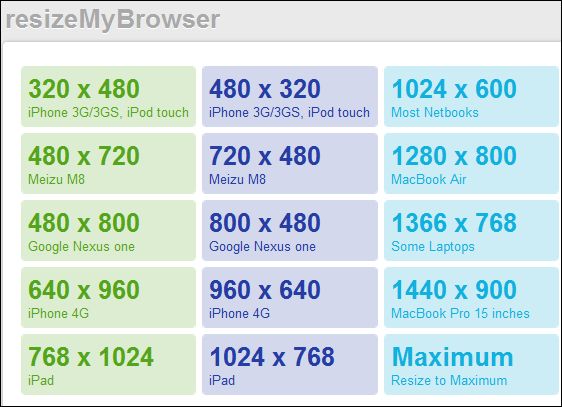
Modern smartphones use many different resolutions.
Examples:
- 1080 × 2400
- 1170 × 2532
- 1440 × 3200
Testing mobile resolutions helps developers optimize websites for mobile users.
SEO Benefits of Responsive Websites
Google prioritizes mobile-friendly websites.
Responsive design improves:
- SEO rankings
- User experience
- Mobile usability
- Website engagement
Screen resolution testing is essential for responsive optimization.
Importance of Browser Compatibility Testing
Different browsers may display websites differently.
Developers test websites on:
- Chrome
- Firefox
- Safari
- Edge
Screen resolution tools help ensure compatibility across browsers and devices.
Screen Resolution and Video Streaming
Higher resolutions improve video quality significantly.
Popular streaming resolutions include:
- 720p
- 1080p
- 1440p
- 4K
Higher resolutions require faster internet speeds.
Internet Speed Requirements for High Resolutions
Recommended speeds:
1080p Streaming
- Minimum 10 Mbps
4K Streaming
- Minimum 25 Mbps
Stable internet ensures smoother playback and better quality.
Importance of Color Accuracy
Color accuracy is essential for:
- Designers
- Photographers
- Video editors
Professional monitors offer:
- Better color calibration
- Wider color gamuts
- HDR support
High-resolution displays improve editing precision.
HDR Displays Explained
HDR stands for High Dynamic Range.
HDR improves:
- Brightness
- Contrast
- Color depth
HDR content appears more realistic and vibrant.
AI and Modern Display Technology
Artificial intelligence is improving display technology rapidly.
AI now helps with:
- Smart brightness adjustment
- Resolution upscaling
- Color optimization
- Motion smoothing
AI-powered displays continue evolving in 2026.
Future of Screen Resolution Technology
Future trends include:
- 8K mainstream adoption
- Foldable displays
- Transparent screens
- OLED advancements
- MicroLED technology
- AI-enhanced visuals
Display technology is advancing faster than ever before.
Best Uses of a Screen Resolution Test Tool
A screen resolution tool is useful for:
- Developers
- Designers
- Gamers
- Students
- Bloggers
- Video editors
- Website owners
These tools improve compatibility and display optimization.
Why Every Website Owner Needs Resolution Testing
Websites must work correctly on all devices.
Resolution testing helps:
- Improve user experience
- Reduce layout issues
- Increase mobile compatibility
- Improve SEO performance
Responsive websites are essential in modern web development.
Tips for Better Display Quality
To improve display quality:
- Use native resolution
- Update graphics drivers
- Use proper scaling
- Calibrate colors
- Use high-quality monitors
These steps improve sharpness and performance.
Importance of Free Online Screen Resolution Tools
Free online tools provide many advantages:
- Instant access
- No installation required
- Fast results
- Cross-platform support
Users can test screen information directly through browsers.
Why Screen Resolution Testing Matters in 2026
Modern devices now come in many different:
- Screen sizes
- Aspect ratios
- Pixel densities
- Refresh rates
Testing display compatibility is more important than ever.
Developers and designers must ensure websites and apps work perfectly on all devices.