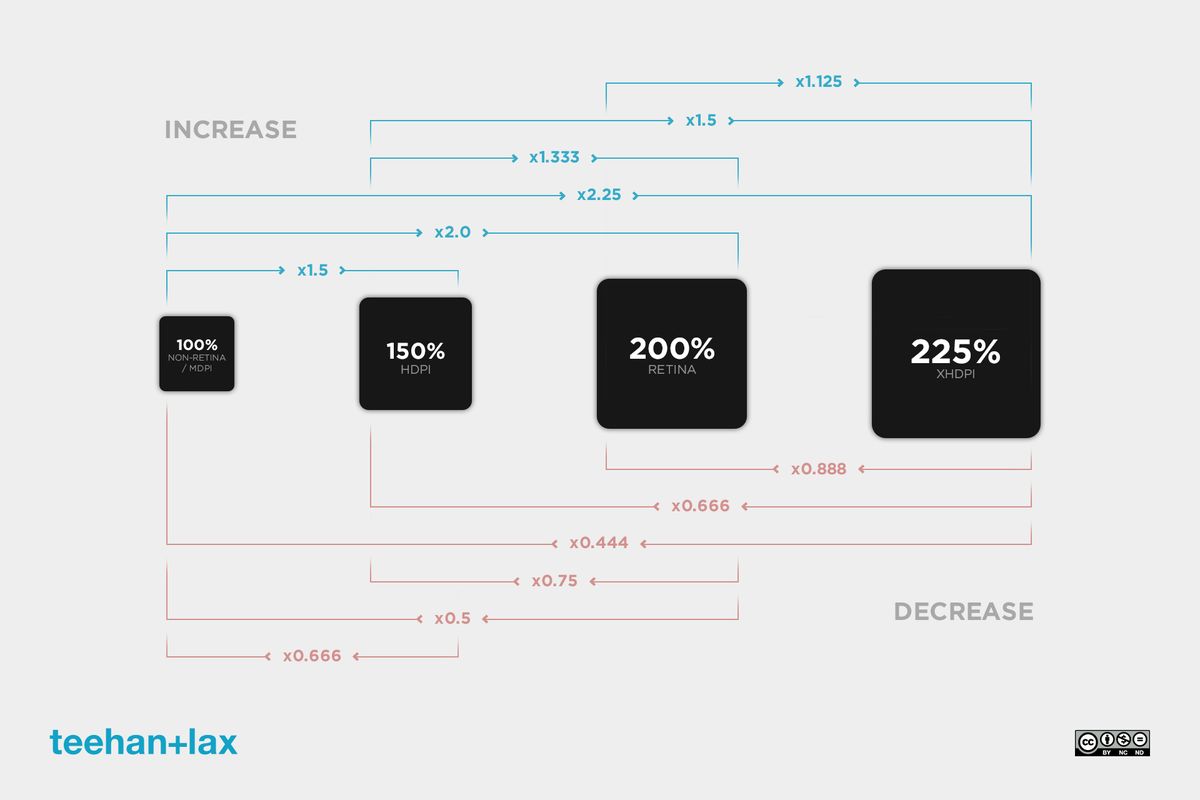
Device Pixel Ratio refers to the relationship between physical pixels and CSS pixels.
For example:
A DPR of 2 means:
- 1 CSS pixel = 2 physical pixels
High DPR devices provide sharper visuals and smoother graphics.
Modern smartphones often use high DPR displays.
Responsive Web Design and Resolution
Responsive design ensures websites adapt to all screen sizes.
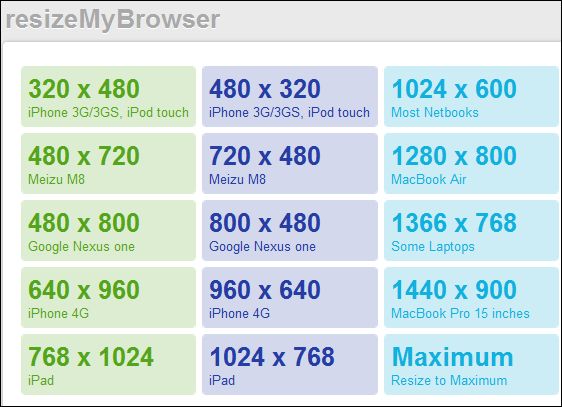
Developers use screen resolution checkers to test:
- Mobile layouts
- Tablet views
- Desktop compatibility
Responsive design is essential for SEO and user experience.
Importance of Viewport Size
Viewport refers to the visible browser area.
Different devices have different viewport sizes.
Understanding viewport dimensions helps developers create responsive websites that work perfectly on all screens.
Retina Displays
Retina displays are high-density screens developed to improve sharpness and clarity.
Advantages include:
- Better text readability
- Sharper graphics
- Improved image quality
Apple devices are famous for Retina technology.
High DPI Displays in 2026
High DPI displays are becoming the industry standard.
Benefits:
- Better visuals
- Reduced eye strain
- Improved productivity
- Enhanced gaming experience
Modern laptops and smartphones increasingly feature high-DPI screens.
Screen Scaling Explained
Operating systems use scaling to improve readability on high-resolution displays.
Common scaling options:
- 100%
- 125%
- 150%
- 200%
Improper scaling can cause blurry text or layout issues.
Common Display Problems
Users often face display-related issues such as:
- Blurry text
- Incorrect scaling
- Stretched images
- Resolution mismatch
- Black bars on screens
A Screen Resolution & DPI Checker helps diagnose these problems quickly.
Best Uses of a Screen Resolution Checker
A free online checker can be useful for:
- Web development
- Gaming setup
- Graphic design
- Device troubleshooting
- Responsive testing
- Monitor calibration
These tools save time and improve accuracy.
How Screen Resolution Affects Gaming
Gaming performance depends heavily on screen resolution.
Higher resolutions provide:
- Better graphics
- Sharper textures
- More realistic visuals
However, higher resolutions also require stronger hardware.
For example:
- 1080p gaming requires moderate GPU power
- 4K gaming requires powerful graphics cards
Best Resolutions for Gaming
1080p Gaming
Best for:
- Competitive gaming
- Budget systems
Advantages:
- Higher FPS
- Lower GPU load
1440p Gaming
Balanced option between quality and performance.
Very popular among modern gamers.
4K Gaming
Provides ultra-sharp visuals but requires powerful GPUs.
Ideal for cinematic gaming experiences.
How Screen Resolution Affects Productivity
Higher resolutions improve multitasking.
Benefits include:
- More screen space
- Better workflow
- Easier editing
- Improved readability
Professionals often prefer dual-monitor or ultrawide setups.
Ultrawide Monitors
Ultrawide displays are increasingly popular.
Common ultrawide resolutions:
- 2560 × 1080
- 3440 × 1440
- 5120 × 1440
Advantages:
- Better multitasking
- Immersive gaming
- Improved productivity
Importance of Aspect Ratio
Aspect ratio describes screen proportions.
Common aspect ratios:
- 16:9
- 21:9
- 4:3
Most modern devices use 16:9 displays.
Ultrawide monitors commonly use 21:9 ratios.
Browser Compatibility Testing
Web developers use resolution checkers for browser testing.
Different browsers may render websites differently.
Testing helps ensure:
- Proper layouts
- Better responsiveness
- Cross-browser compatibility
SEO Benefits of Responsive Design
Google prioritizes mobile-friendly websites.
Responsive design improves:
- SEO rankings
- User experience
- Mobile usability
- Bounce rates
Resolution testing is essential for optimization.
How to Improve Display Quality
Tips for better display quality:
- Use native resolution
- Update graphics drivers
- Adjust scaling properly
- Calibrate monitor colors
- Use high-quality cables
These steps improve sharpness and performance.
Screen Resolution and Eye Strain
Poor display settings can increase eye strain.
To reduce eye fatigue:
- Use proper brightness
- Enable blue light filters
- Use correct scaling
- Sit at proper distance
High-quality displays improve viewing comfort.
Best Tools for Display Testing
Popular display tools include:
- Screen resolution checkers
- DPI analyzers
- Dead pixel tests
- Refresh rate testers
- Color calibration tools
These tools help optimize display performance.
AI and Future Display Technology
Display technology is evolving rapidly.
Future trends include:
- AI-powered display optimization
- Foldable screens
- Transparent displays
- 8K mainstream adoption
- OLED advancements
- MicroLED technology
The future of display technology looks extremely advanced.
Importance of Free Online Tools
Free online tools save users time and money.
Advantages include:
- No downloads required
- Fast results
- Easy accessibility
- Cross-platform support
Online resolution checkers are especially useful for beginners and professionals alike.
Why Laptop Users Need Resolution Checkers
Laptop users frequently adjust:
- Scaling
- External monitors
- DPI settings
- Resolution modes
A checker tool helps ensure optimal display configuration.
Screen Resolution Trends in 2026
Modern trends include:
- High refresh rate displays
- OLED laptops
- 4K mainstream adoption
- Better mobile resolutions
- Higher DPI screens
Display quality continues improving across all devices.
Tips for Choosing the Right Display
Before buying a monitor or laptop, consider:
- Resolution
- Refresh rate
- DPI
- Color accuracy
- Screen size
- Panel type
Choosing the right display improves both productivity and entertainment.